How to Deliver Event Photos to Hundreds of Guests Faster
How to Deliver Event Photos to Guests Faster with AI
How to Deliver Event Photos to Hundreds of Guests Faster
How to Deliver Event Photos to Guests Faster with AI
Introduction
Deliver event photos to guests
A conference, a college fest or a large wedding can produce thousands of photos in a single day. Every guest wants the same thing: the few dozen photos they appear in, as soon as possible.
The traditional approach sends everyone the same link to the full collection. Guests scroll through thousands of thumbnails, give up, or message the organiser asking for "my photos". The photographer then spends hours answering requests one by one.
AI photo delivery reverses the process. Instead of asking guests to search the gallery, the gallery searches for them. This guide explains how it works, how to set it up before, during and after an event, and where its limits are.
Quick summary
- Sending every guest the full gallery forces them to scroll through thousands of photos to find a few.
- AI photo delivery matches each guest's selfie against the event photos and shows only the photos they appear in.
- Share one QR code or link before and during the event so guests can register early.
- Upload in batches during the event, so new photos are matched and guests are notified as coverage comes in.
- Explain face search clearly, ask for consent and keep ordinary gallery browsing available.
- Treat matching as a discovery aid: review results and keep a fallback for guests who are not found.
Why manual photo delivery breaks at scale
Manual methods work for a family session. They break down when hundreds of guests each need a different subset of the same collection.
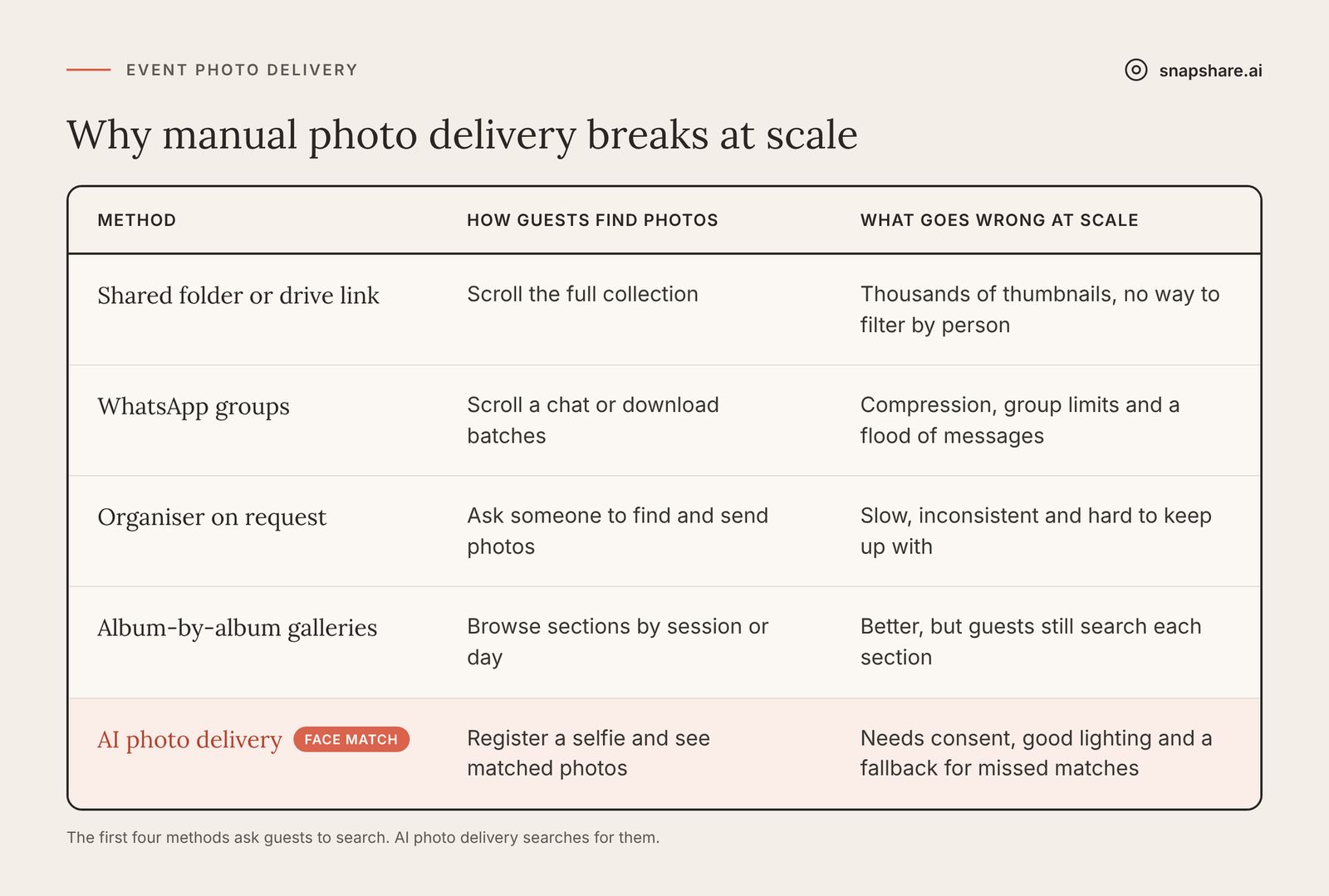
The first four methods all ask the guest to do the searching. AI photo delivery is the only one that does the searching for them.
How AI Photo Delivery works
AI photo delivery uses face matching to connect each guest to the photos they appear in. In Snapshare's AI Photo Delivery, the flow runs in five steps:
- The photographer uploads event photos to the event gallery, in one batch or several during the day.
- A guest opens the event link or scans a QR code shared at the venue.
- The guest registers a selfie through face search registration.
- The system matches the selfie against the uploaded photos and shows the guest the photos they appear in.
- New uploads are matched automatically. When a later batch contains new photos of a registered guest, Snapshare sends a new-photo notification.
The guest never scrolls the full gallery unless they choose to. For example, a delegate at a conference with 2,000 photos sees only the handful they appear in, not all 2,000.
For a deeper explanation of the technology, see our guide to what AI face recognition in photography is.
Before the event: set up delivery so guests register early
Most delays happen because guests learn about photo delivery too late. Set it up before the first photo is taken.
Create the event and its access settings
• Create the event gallery and choose who can open it. Snapshare supports client, PIN-based or PIN-less access.
• Decide whether guests can download, and at what level. Download access control works for individual photos and the full gallery, and downloads can be PIN-protected or hidden.
• Add your branding so guests know who took the photos.
Share one link and one QR code
Guests should only need one way in. Put the same link or QR code everywhere:
• In the invitation, registration confirmation or event app.
• On a standee at the entrance and on the registration desk.
• On screens between sessions at conferences.
• In the WhatsApp or email message the organiser already sends.
Snapshare reviewers describe placing a QR code at the venue, so participants receive photos immediately. A QR code works best where guests already pause, such as the entrance, the stage area or the food counters.
Tell guests what face search does
Add one short line beside the QR code, for example: "Scan and take a selfie to find your photos. Your selfie is used only to find photos of you at this event." Confirm that the wording matches how your platform actually handles selfies before you print it.
During the event: upload in batches, not all at the end
The biggest speed gain comes from delivering while the event is still running. Guests are most likely to share photos on the day, while they are still together.
• Upload after each key moment. A keynote, an award ceremony or a wedding entrance is a natural break to send a batch.
•Let new uploads match automatically. Snapshare's face match on new uploads checks each new batch against guests who have already registered.
•Let notifications do the follow-up. New-photo notifications alert registered guests when a batch contains new photos of them, so nobody needs to keep checking the link.
•Keep uploads running in the background. Snapshare's desktop upload tools include an upload queue, auto pause and resume on network failure, and folder sync, which help at venues with unreliable internet.
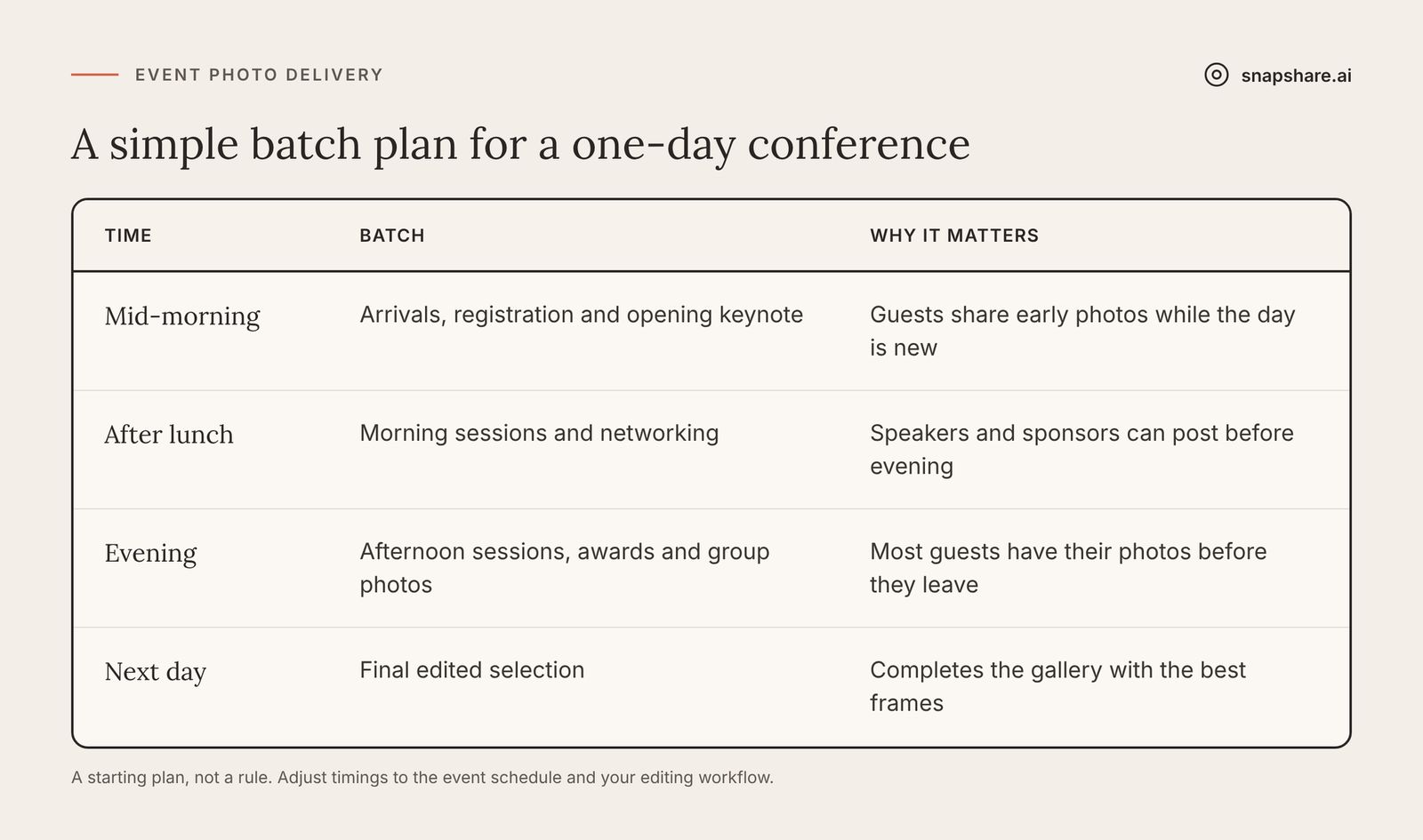
The timings are a starting plan, not a rule. Adjust them to the event schedule and your editing workflow.
After the event: complete the gallery and close the loop
- Publish a Highlights set. Snapshare Highlights can be made public and shared through a link, which suits organisers, sponsors and social media teams who need the best frames quickly.
- Check download settings. Confirm whether guests can download their matched photos, and whether full-size downloads are available.
- Send one final message. Tell guests the gallery is complete and how long it will stay online.
- Review requests from guests who were not matched. Point them to ordinary browsing, or check their photos manually.
For weddings and private events, see our guide to organising wedding photos into a client gallery, which covers sections and album selection for the couple.
Privacy and consent: how to use face search responsibly
Face search processes a guest's facial image, so it needs more care than an ordinary gallery link. Speed should never come at the cost of guest trust.
• Make it optional. Guests who do not want to register a selfie should still be able to browse the gallery normally.
• Explain it in plain words. Say what the selfie is used for, who can see the results and how long data is kept.
• Check the platform's data handling. Review how selfies and matching data are stored, retained and deleted. Snapshare publishes privacy and GDPR pages to review before the event.
• Know the local rules. Requirements differ by country. India's Digital Personal Data Protection Act, the EU's GDPR and the UAE's Personal Data Protection Law are examples of laws an organizer may need to consider. This is not legal advice.
• Remember that matching is not access control. A matched photo is still in a gallery that may be shared. Use PIN or client access when an event is private.
Face search makes photos easier to find. Privacy depends on the access settings and how the organizer explains them.
What AI matching cannot do, and how to cover the gaps
Face matching speeds up discovery, but it is not perfect. Plan for the photos it will miss.
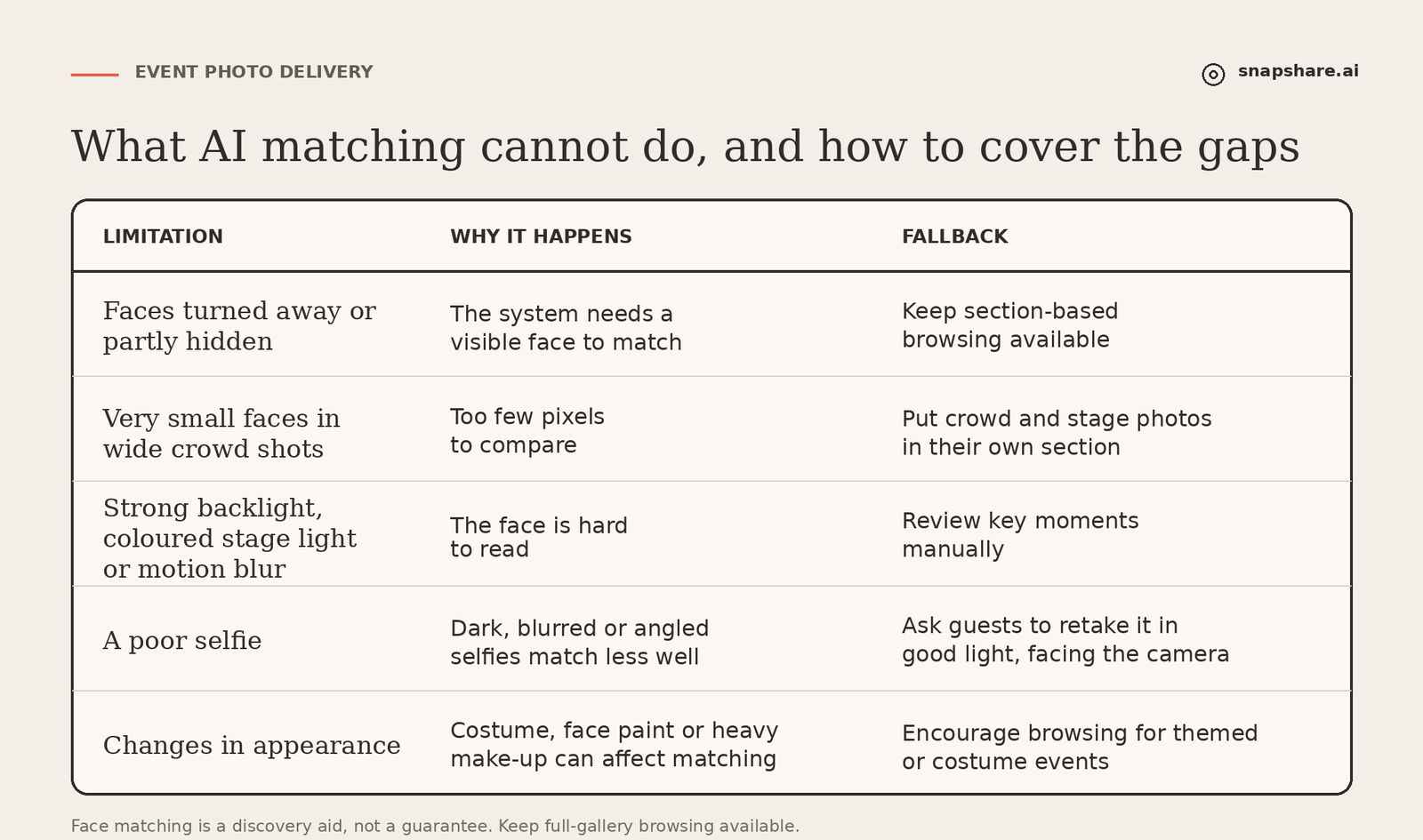
Never promise guests that every photo of them will be found. Say that face search helps them find their photos faster, and that the full gallery is still there.
Event photo delivery checklist
Before the event
• Event gallery created, with access and download settings chosen
• One link and one QR code shared in invitations and at the venue
• Short face search explanation placed beside the QR code
• Privacy wording checked against the platform's data handling
During the event
•Batches uploaded after each key moment
•New-photo notifications reaching registered guests
•Someone assigned to answer guest questions on the day
After the event
• Final edited selection uploaded
• Highlights published for the organizer and sponsors
• Final message sent with the gallery's access period
• Unmatched guests pointed to ordinary browsing
Frequently asked questions
What is AI photo delivery?
AI photo delivery uses face matching to send each event guest the photos they appear in. A guest registers a selfie, and the system returns matching photos from the event gallery.
How do guests find their photos at an event?
Guests scan a QR code or open an event link, then register a selfie. They see the photos they appear in and can still browse the full gallery.
Can guests get photos while the event is still running?
Yes, if the photographer uploads in batches. Snapshare matches new uploads against registered guests and sends new-photo notifications when new photos of them are found.
Is face recognition photo sharing accurate?
Accuracy depends on lighting, face angle, face size in the frame and selfie quality. Treat it as a discovery aid, review important moments manually and keep browsing available.
Is face search safe for event guests?
It can be used responsibly if it is optional, clearly explained and backed by the platform's data protections. Check how selfies and matching data are stored and deleted and review local privacy laws.
Does face matching make a gallery private?
No. Matching helps guests find photos. Privacy depends on the gallery's access settings, such as client or PIN-based access.
How many guests can use AI Photo Delivery?
Capacity depends on the plan. Snapshare offers separate event plans with AI credits, so check the pricing page for current limits.
Deliver your next event faster with AI Photo Delivery
Hundreds of guests do not need one giant link. They need their own photos, on the day, without searching. Share one QR code, upload in batches and let face matching do the sorting, while keeping browsing and clear consent in place.
Start free with Snapshare: create a test event, register your own selfie and see how matching works before your next event. Event organizers can compare the event plans on the same page.
Publish on:
Written By

Najiha Thasni
.
Subscribe to our newsletter
Publish on:
Written By
Najiha Thasni
.