What's New in Snapshare
Multi-Location Shoots, Split Downloads, and Engagement Tracking
What's New in Snapshare
Multi-Location Shoots, Split Downloads, and Engagement Tracking
Introduction
Introduction
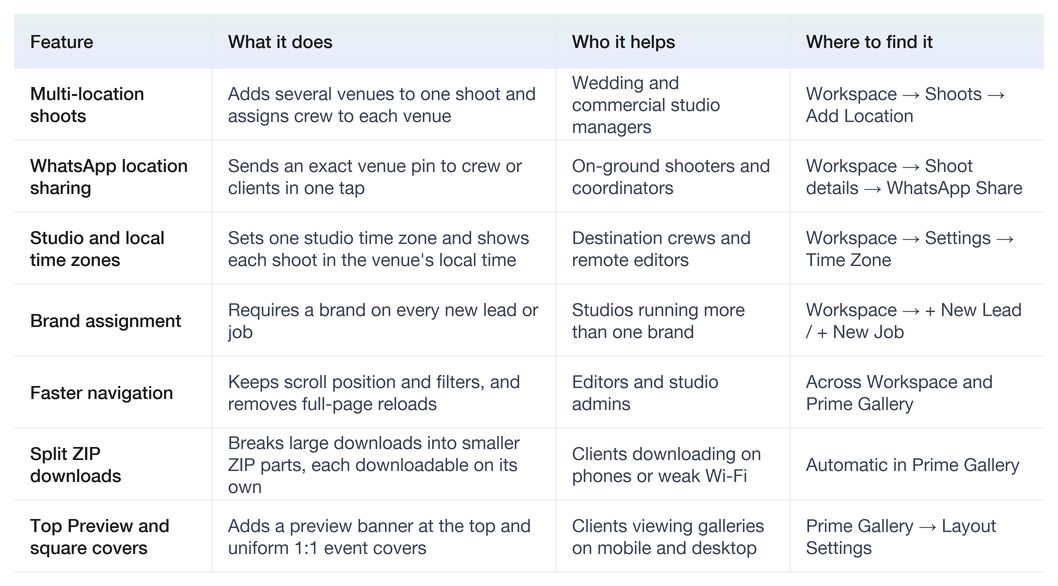
Snapshare's October 2026 release adds multi-location shoots with crew per venue, one-tap WhatsApp location sharing, studio and local time zones, required brand assignment, split ZIP downloads in Prime Gallery, and tap tracking for Digital Invitations and shared links.
Photographers spend hours perfecting lighting and edits, then lose time to preventable friction: sending three venue pins to a second shooter at 6 AM, losing your place while sorting 900 photos, or hearing from a client that their 12 GB gallery download timed out on mobile data.
These updates were shaped by feedback from wedding and event studios. Here is what changed, who it helps, and where to find each feature.
October 2026 feature summary
Shoot planning in Workspace
Snapshare Workspace now keeps venue schedules, crew assignments and brand pipelines for a shoot in one place. That replaces the scattered chat threads that cause missed call times on multi-venue weddings and commercial productions.
Multiple locations with crew per venue
A single event rarely stays at one address. One team covers bridal prep at the hotel while another sets up lighting at the ceremony hall.
- What changed: You can add several venues to one shoot record and assign specific photographers, videographers or assistants to each location.
- How to use it: Go to Workspace → Shoots, create or edit a shoot, click + Add Location, enter the venue details, and pick the team members for that venue.
- Plan availability: Included on all active Workspace plans.
One-tap WhatsApp location sharing
- What changed: Instead of copying map links between apps on shoot morning, you can send the exact venue pin to your crew or clients on WhatsApp.
- How to use it: Set your studio time zone under Workspace → Settings → Time Zone, then choose the venue's time zone when you create a destination shoot.
Brand assignment for new leads and jobs
- What changed: Every new lead and job is assigned to a brand when it is created. If you run more than one photography brand under one account, inquiries, contracts, schedules and client galleries stay separated from the first inquiry.
- How to use it: When you click + New Lead or + New Job, choose the brand from the required Brand dropdown.
- Plan availability: Multi-brand management depends on your Workspace plan. Compare plans on our pricing page.
Faster navigation across your workspace
Three usability updates cut the small delays that add up when you manage dozens of client galleries.
- Saved scroll position and filters: Open a gallery or event from a filtered list and click Back. Snapshare returns you to the same spot, with your sort order and filters still applied.
- Instant updates: Edits to event details, studio profiles, Digital Invitations, photo selections and team permissions save and show immediately, without a full-page reload.
- Clear messages for expired or removed links: When a client or guest opens an event or invitation link that has expired or been unpublished, they see a short message saying the link is no longer active, instead of a browser error.
Prime Gallery: split downloads, Top Preview and square covers
This release makes large deliveries more reliable on mobile networks and gives galleries a more consistent look in Prime Gallery.
Split ZIP downloads for large galleries
- What changed: Large gallery downloads are now split into smaller ZIP parts, each with its own download button. If a mobile or Wi-Fi connection drops mid-transfer, your client downloads that one part again instead of restarting the whole collection.
- How to use it: Nothing to set up. Splitting turns on automatically for large high-resolution downloads in Prime Gallery.
Top Preview and square event covers
- What changed: Galleries now open with a Top Preview banner, and event covers on the studio home screen and gallery index use a uniform 1:1 square format.
- How it applies: New events use square covers by default. You can update existing galleries at any time under Prime Gallery → Layout Settings.
Engagement tracking for Digital Invitations and shared links
Studios and event hosts can now see interaction counts under Events → Insights.
- Shared link tap counts: See how many taps your shared Prime Gallery links, event preview links and Digital Invitation links receive.
- Digital Invitation insights: See how many guests open your invitations and view the schedule or venue details.
What are "I'm Attending" cards?
"I'm Attending" cards are personalized RSVP graphics that Snapshare creates when a guest confirms attendance through a Digital Invitation. Guests can download the card or share it on WhatsApp and social media. Studios and hosts can see card interactions under Events → Insights.
Example: a three-venue Dubai wedding from booking to delivery
This illustrative workflow shows how the October 2026 updates connect on a typical destination wedding.
1. Booking and brand: A studio logs a new inquiry for a Dubai destination wedding in Workspace and assigns it to its wedding brand. It creates one shoot with three locations (hotel prep, ceremony venue, reception hall) and assigns crew to each.
2. Invitations: The couple sends Digital Invitations. The studio follows guest opens and "I'm Attending" card interactions under Events → Insights.
3. Shoot day: The lead photographer uses WhatsApp Share in Workspace to send each crew its venue pin. Back in Kochi, the culling editor sees the same schedule converted correctly from Dubai time.
4. Delivery: While sorting 900+ photos, the editor moves between folders without losing scroll position or filters. The couple then opens their Prime Gallery link and downloads the high-resolution collection on their phones in split ZIP parts.
Suggest what we build next with My Ideas
Several of these updates, including one-tap WhatsApp location sharing and saved scroll position, started as studio requests in My Ideas. You can submit and vote on features from inside your account.
1. Log in to Workspace and open the My Ideas tab in the left sidebar. A red dot appears there whenever new updates ship.
2. Click Submit Idea and describe the workflow problem or feature you need.
3. Browse other photographers' requests, check their build status, and vote on what we build next.
Frequently asked questions
How do photographers manage multiple venues and crew for one wedding shoot?
Keep every venue, call time and crew assignment in a single shoot record instead of separate spreadsheets or chat groups. In Snapshare Workspace, you can add several locations to one shoot, assign team members to each venue, show times in each venue's local time zone, and send venue pins on WhatsApp in one tap.
How can I stop large client gallery downloads from failing on mobile?
Split the download into smaller ZIP files instead of serving one very large archive, so a dropped connection costs one part rather than the whole transfer. Snapshare Prime Gallery does this automatically for large high-resolution collections, and each part has its own download button.
Can I run multiple photography brands in one Snapshare account?
Yes, on Workspace plans that support multiple brands. Snapshare asks you to choose a brand whenever you add a new lead or job, so inquiries, schedules and client galleries stay under the right brand from the first inquiry.
How does Snapshare handle shoots in different time zones?
You set a default studio time zone under Workspace → Settings → Time Zone, and each shoot displays its schedule in the venue's local time. Destination crews and remote editors therefore see the same call times correctly.
Which Snapshare plans include the October 2026 features?
Multi-location shoots, faster navigation, split ZIP downloads in Prime Gallery and My Ideas are included on all active Snapshare plans. Multi-brand management depends on your Workspace plan. See the Snapshare pricing page for plan details.
Ready to streamline your next shoot?
- New to Snapshare? Start your free trial to try multi-location shoot planning in Workspace and split downloads in Prime Gallery, or compare plans.
- Already using Snapshare? Log in to your Workspace to use the October 2026 updates on your current projects.
Publish on:
Written By

Paul James
Digital Marketer
Subscribe to our newsletter
Publish on:
Written By
Paul James
Digital Marketer